
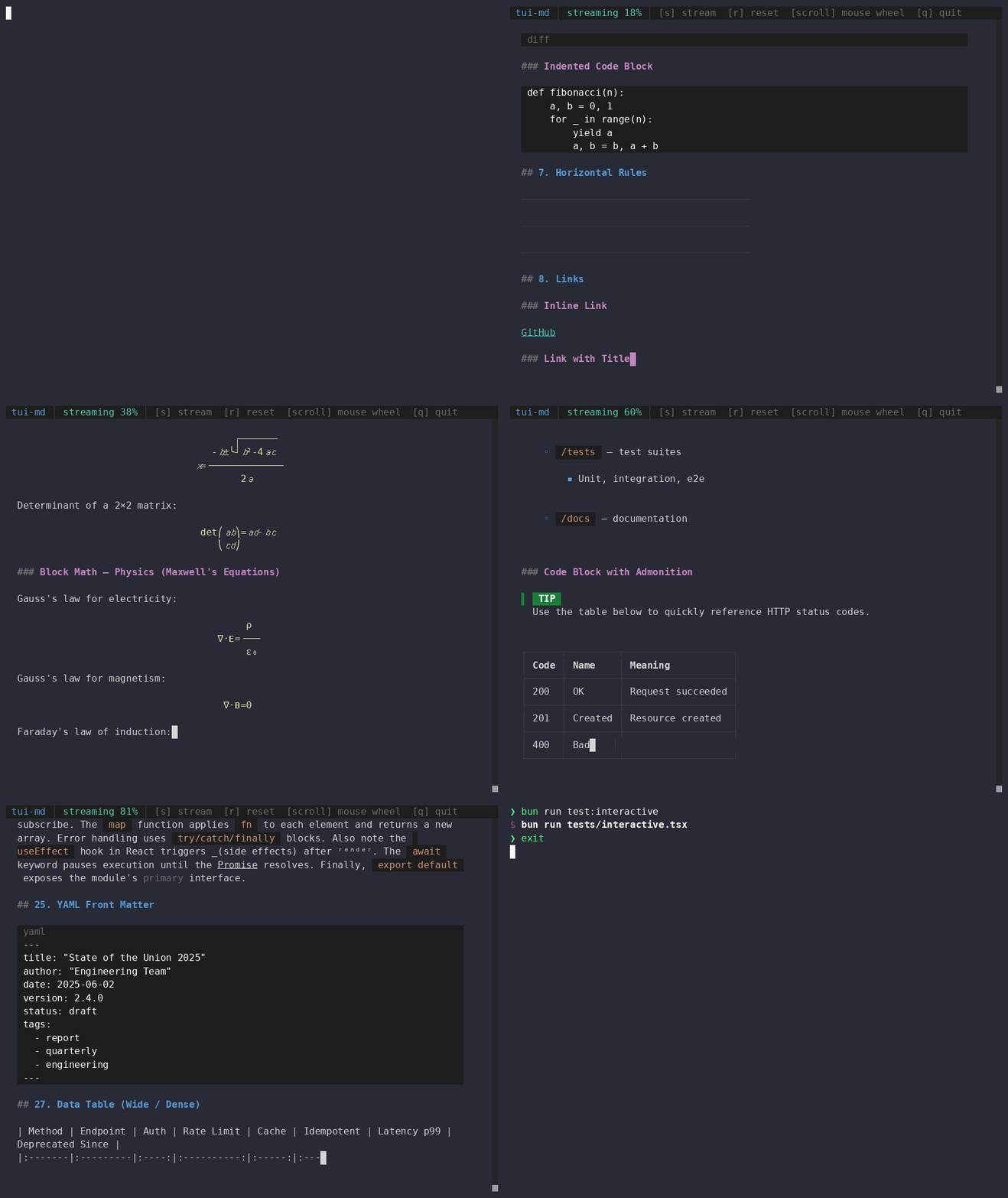
Markdown rendering components for OpenTUI React applications.
tui-md is a library, not a standalone CLI. It exports a React component that renders rich markdown inside an OpenTUI terminal app — with syntax-highlighted code blocks, LaTeX math, Mermaid diagrams, tables, GFM extensions, and interactive clickable links.
bun add tui-md @opentui/core @opentui/react react@opentui/core, @opentui/react, and react are peer dependencies, so your app controls their versions.
- CommonMark plus GFM tables, task lists, strikethrough, autolinks, footnotes, front matter, math, definition lists, abbreviations, gemoji, and GitHub alert blockquotes.
- Syntax-highlighted fenced code blocks using OpenTUI's native
<code>component. - Diff and patch blocks rendered with OpenTUI's unified diff view.
- Mermaid diagrams rendered as terminal-friendly ASCII art through
beautiful-mermaid. - LaTeX display and inline math rendered as Unicode art without an external binary.
- Images rendered as OpenTUI-contained terminal cell art through
chafa, avoiding sixel/graphics-layer leaks into terminal scrollback. - Wide code, Mermaid, diff, and table blocks get contained scrolling instead of polluting the main page layout.
- Inline overflow blocks support mouse wheel and click-drag scrolling, then hand scrolling back to the main page when the block reaches an edge.
- Wide tables keep measured natural column widths and scroll horizontally only; vertical mouse wheel movement continues to scroll the document.
- Clickable links with hover styling, built-in open handling, file path support, and custom
onLinkClickoverride. - Theme tokens for text, headings, links, code, math, tables, alerts, keyboard keys, highlights, and diffs.
- Streaming mode for live markdown output with an appended block cursor.
import { render } from "@opentui/react";
import { Markdown } from "tui-md";

render(
  <Markdown
    content={"# Hello\n\nThis is **markdown** rendered in OpenTUI."}
  />
);import {
Markdown,
defaultTheme,
parse,
parseStreaming,
resolveTheme,
type MarkdownProps,
type TuiMdLinkHandler,
type TuiMdTheme,
} from "tui-md";<Markdown
content={markdown}
streaming={false}
width="100%"
theme={{ link: "#8be9fd" }}
onLinkClick={(url) => {
// Optional: let the host app decide how links should behave.
}}
/>Props:
| Prop | Type | Default | Description |
|---|---|---|---|
content |
string |
required | Markdown source to render. |
streaming |
boolean |
false |
Appends a block cursor (█) to the last text node for streaming/live output. |
width |
number | string |
"100%" |
Width passed to the root OpenTUI box. |
theme |
Partial<TuiMdTheme> |
{} |
Color overrides merged with defaultTheme. |
onLinkClick |
TuiMdLinkHandler |
built-in opener | Optional link click handler. |
tui-md uses a unified/remark pipeline with the following plugins to cover standard CommonMark plus a wide set of extensions:
| Feature | Syntax |
|---|---|
| Headings (H1–H6) | # … ###### |
| Paragraphs | plain text |
| Blockquotes | > … |
| Ordered lists | 1. … |
| Unordered lists | - … / * … / + … |
| Task lists | - [x] done / - [ ] todo |
| Thematic breaks | --- |
| Front matter | YAML fenced with --- |
| Definition lists | Term\n: description |
| Footnote definitions | [^label]: … |
| Tables | GFM pipe syntax |
| Fenced code blocks | ```lang … ``` |
| Math (display) | $$…$$ |
| GitHub alerts | > [!NOTE], [!TIP], [!IMPORTANT], [!WARNING], [!CAUTION] |
| Mermaid diagrams | ```mermaid … ``` |
| Diff/patch blocks | ```diff … ``` |
| Feature | Syntax |
|---|---|
| Bold | **text** / __text__ |
| Italic | *text* / _text_ |
| Strikethrough | ~~text~~ |
| Inline code | `code` |
| Links | [label](url) |
| Inline math | $…$ |
| Footnote references | [^label] |
| Highlight / mark | ==text== |
| Abbreviations | *[KEY]: definition (auto-expands throughout the document) |
| Gemoji shortcodes | :smile:, :rocket:, etc. |
| Superscript | <sup>text</sup> |
| Subscript | <sub>text</sub> |
| Keyboard keys | <kbd>Ctrl</kbd> / <kbd>Ctrl+S</kbd> |
| Underline | <u>text</u> |
| Insert (diff add) | <ins>text</ins> |
| Delete (diff del) | <del>text</del> |
| Small text | <small>text</small> |
| Inline code (HTML) | <code>, <samp>, <tt> |
| Line breaks | <br> |
Note: Unrecognized inline HTML tags are treated as transparent passthroughs — their children are rendered with current text attributes.
All fenced code blocks are rendered with full syntax highlighting powered by OpenTUI's <code> component using a GitHub Dark–inspired token style. The language label is shown above the block.
```typescript
const greet = (name: string) => `Hello, ${name}!`;
### Diff blocks

Fenced blocks with `diff` or `patch` as their language are rendered with OpenTUI's native unified diff view — additions in green, deletions in red.

### Mermaid diagrams

Fenced blocks with `mermaid` as their language are rendered as terminal-friendly ASCII art via the [`beautiful-mermaid`](https://github.com/nicholasgasior/beautiful-mermaid) package.

```markdown
```mermaid
graph LR
    A --> B --> C
### LaTeX math

Math expressions are rendered as genuine Unicode art by a built-in TypeScript port of [TeXicode](https://github.com/nicholasgasior/texicode) — no subprocess or external binary required. This produces real stacked fractions, vertical integral signs, positioned super/subscripts, and proper `√` glyphs.

- **Display math** — `$$…$$` or a fenced `math` block — is centered in its own box.
- **Inline math** — `$…$` — is rendered inline within text.

Results are cached in memory so re-renders of the same expression are free.

### Tables

Tables are rendered with full Unicode box-drawing borders (`┌─┬─┐ │ ├─┼─┤ └─┴─┘`). Column widths are automatically measured by scanning cell content. If a table is wider than the terminal, it keeps its natural width and becomes horizontally scrollable instead of squeezing columns.

Column alignment (`left`, `center`, `right`) from the GFM alignment marker is respected.

Wide tables use horizontal-only mouse wheel and click-drag scrolling. Vertical wheel events continue to the page scroll, and horizontal scrolling hands back to the parent when the table reaches either edge.

### Images

Images are downloaded and rendered as terminal cell art via `chafa --format=symbols --colors=full`. The output is parsed into OpenTUI text spans, so images stay inside the normal render tree and do not leave sixel/terminal-graphics artifacts behind when the document scrolls or rerenders.

If `chafa` is not installed, `tui-md` renders an inline error message instead of failing the whole markdown render.

### Contained overflow scrolling

Wide or tall fenced code, Mermaid, and diff blocks are rendered inside contained OpenTUI scrollboxes. Mouse wheel and click-drag gestures scroll the inline block while it can move; once the block reaches the top, bottom, left, or right edge, wheel events bubble back to the main document scrollbox.

### GitHub alerts

`> [!NOTE]`, `> [!TIP]`, `> [!IMPORTANT]`, `> [!WARNING]`, and `> [!CAUTION]` are rendered as styled callout blocks with a colored left border and a bold badge label:

- **NOTE** — blue (`#0969da`)
- **TIP** — green (`#1a7f37`)
- **IMPORTANT** — purple (`#8250df`)
- **WARNING** — amber (`#bf8700`)
- **CAUTION** — red (`#cf222e`)

### Front matter

YAML front matter (fenced with `---`) is displayed in a rounded border box labelled **FRONT MATTER** in muted colour.

### Keyboard keys

`<kbd>` tags are rendered as styled key caps with a background tint and bracketed notation. Compound keys like `<kbd>Ctrl+S</kbd>` are split on `+` and each key rendered individually with a `+` separator.

### Superscript & subscript

`<sup>` and `<sub>` tags map to Unicode superscript/subscript characters where the Unicode block covers them (digits, many lowercase/uppercase letters, common symbols). When a character has no Unicode equivalent the whole string falls back to `^(text)` or `_(text)` notation.

### Streaming mode

Set `streaming={true}` to append a `█` block cursor to the last text leaf in the AST on every render. This is designed for live/streaming content where the markdown source grows token by token.

```tsx
<Markdown content={partialContent} streaming={true} />
Clicked links use the package's built-in multi-strategy opener:
http,https, andmailtolinks → system default browser/app (xdg-openon Linux,openon macOS,starton Windows).- File paths (relative or
file://) → tried in order:$VISUALor$EDITORenvironment variable.- GUI editor:
code,code-insiders. - Inline terminal editor (suspends/resumes the OpenTUI renderer):
nvim,vim,nano,vi. - Terminal editor in a new terminal window:
x-terminal-emulator,gnome-terminal,konsole,xfce4-terminal,alacritty,kitty,wezterm. - System file association (
xdg-open/open).
- If the file does not exist, an inline error message is shown next to the link.
Links highlight on hover and change colour when hovered (uses theme.accent + theme.codeBg).
Pass onLinkClick to take full control:
<Markdown
  content="[Open docs](https://example.com)"
  onLinkClick={(url) => {
    console.log("link clicked", url);
  }}
/>
Return an error result to display an inline failure message beside the link:
<Markdown
  content="[Missing file](./missing.md)"
  onLinkClick={() => ({
    ok: false,
    reason: "file-not-found",
    message: "File not found",
  })}
/>
TuiMdLinkHandler signature:
type TuiMdLinkHandler = (url: string) =>
  void | OpenUrlResult | Promise<void | OpenUrlResult>;

type OpenUrlResult =
  | { ok: true }
| { ok: false; reason: "file-not-found" | "open-failed"; path?: string; message: string };All colours are defined in TuiMdTheme. Pass a partial object to <Markdown theme={…} /> — it is merged with defaultTheme.
import { Markdown, defaultTheme } from "tui-md";

<Markdown
  content={markdown}
  theme={{
    ...defaultTheme,
    text: "#f8f8f2",
    link: "#8be9fd",
    codeBg: "#282a36",
  }}
/>| Token | Default | Used for |
|---|---|---|
text |
#d4d4d4 |
Body text |
muted |
#6b6b6b |
Heading prefixes, blockquote gutter, footnote labels, front matter |
accent |
#569cd6 |
Link hover colour, heading fallback, definition list terms |
border |
#3c3c3c |
Table borders, blockquote bar, thematic break |
link |
#4ec9b0 |
Link default colour |
code |
#ce9178 |
Inline code foreground |
codeBg |
#1e1e1e |
Inline code & code block background |
math |
#dcdcaa |
Math expressions |
list |
#569cd6 |
List bullets and numbers |
kbd |
#d4d4d4 |
Keyboard key foreground |
kbdBg |
#3c3c3c |
Keyboard key background |
highlightFg |
#000000 |
==mark== foreground |
highlightBg |
#ffff00 |
==mark== background |
diffAdd |
#4ec9b0 |
<ins> / diff + lines |
diffDel |
#f44747 |
<del> / diff - lines, link error messages |
h1 |
#4ec9b0 |
H1 heading colour |
h2 |
#569cd6 |
H2 heading colour |
h3 |
#c586c0 |
H3 heading colour |
h4 |
#dcdcaa |
H4 heading colour |
h5 |
#ce9178 |
H5 heading colour |
h6 |
#6b6b6b |
H6 heading colour |
import { resolveTheme, defaultTheme } from "tui-md";

const theme = resolveTheme({ link: "#8be9fd" });
// => { ...defaultTheme, link: "#8be9fd" }parse and parseStreaming are exported for apps that need access to the markdown AST before (or instead of) rendering. Both return an mdast Root node with all custom transformations already applied.
import { parse, parseStreaming } from "tui-md";

// Standard parse
const ast = parse("# Title\n\n==highlighted==");

// Streaming parse — injects a block cursor into the last text leaf
const ast = parseStreaming("# Title\n\nPartial sen");
The full remark pipeline applied during parsing:
| Plugin | Purpose |
|---|---|
remark-parse |
CommonMark base |
remark-frontmatter |
YAML front matter |
remark-gfm |
Tables, strikethrough, task lists, autolinks |
remark-math |
$…$ and $$…$$ math |
remark-definition-list |
Definition list syntax |
remarkAbbr (built-in) |
*[KEY]: def abbreviations |
remarkMergeInlineHtml (built-in) |
Merges open/close HTML tag pairs into a single node |
remarkMark (built-in) |
==text== highlight syntax |
remarkGemoji (built-in) |
:shortcode: emoji expansion |
remark-github-blockquote-alert |
GitHub-style [!NOTE] / [!WARNING] alerts |
bun install
bun run test          # typechecks + builds
bun run typecheck     # typecheck only
bun run test:interactive  # launch the interactive OpenTUI demo
npm pack --dry-run    # preview what gets published to npm
bun run test runs TypeScript typechecking followed by the production build into dist/. npm pack --dry-run shows exactly what would be published.
bun run test:interactiveLaunches a live OpenTUI app (tests/interactive.tsx) that renders a rich markdown document covering every supported feature — useful for visually validating changes.
MIT