Native macOS CLI tool for Swift codebase intelligence — find critical files, generate dependency graphs, learning paths, and AI-powered insights.
Built 100% in Swift using Apple-native technologies
cd SwiftCodeContext
swift run codecontext analyze ~/path/to/your/project --open
That's it. swift run builds automatically if needed, then opens the HTML report in Safari. No separate swift build step required.
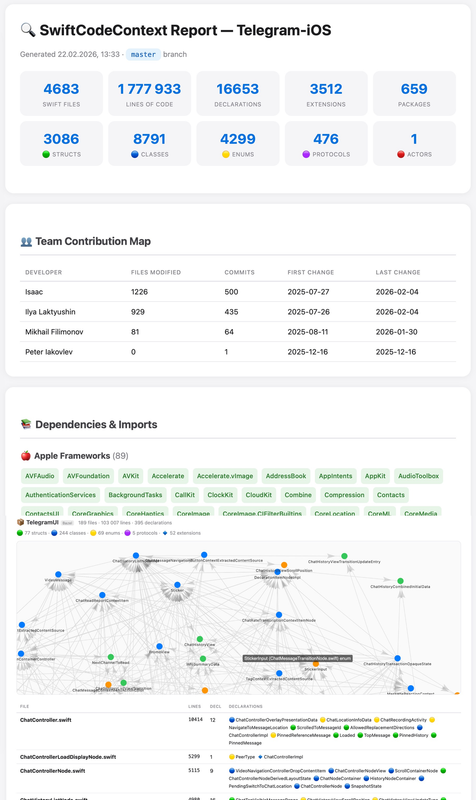
The generated HTML report includes:
-
📊 Summary — total files, lines of code, declarations by type (structs, classes, enums, protocols, actors), and package count
-
👥 Team Contribution Map — developer activity tracking with files modified, commit counts, and first/last change dates
-
📚 Dependencies & Imports — comprehensive classification into Apple frameworks, external dependencies, and local Swift packages with interactive tag clouds
-
🔥 Knowledge Hotspots — files with the highest PageRank scores, identifying the most connected and architecturally significant code. Each entry includes clickable module badges for quick navigation and inline documentation previews where available
-
📋 Module Insights — package penetration analysis showing which modules are imported by the most other packages (foundational dependencies), plus quality metrics including top modules by TODO/FIXME density and technical debt indicators
-
📏 Longest Functions — ranked list of functions with the highest line counts, featuring clickable module badges for context and quick navigation to potential refactoring candidates
-
📦 Packages & Modules — detailed breakdown of each local Swift package with:
- Complete file inventory sorted by lines of code
- Declaration statistics by type (classes, structs, enums, protocols, actors, extensions)
- Interactive force-directed dependency graph per package, colored by declaration type (🔵 classes, 🟢 structs, 🟡 enums, 🔴 actors)
- File-level annotations showing code intent through inline documentation previews
- Precise line counts and declaration tags for every file
- Package-level metrics including total files, lines of code, and declaration distribution
cd SwiftCodeContext

# Build
swift build

# Analyze a Swift project
swift run codecontext analyze /path/to/your/swift/project

# See all commands
swift run codecontext --helpcd SwiftCodeContext
# Debug build (fast compilation)
swift build
# Run directly
swift run codecontext analyze ~/Projects/MyApp
# Release build (optimized, ~3x faster runtime)
swift build -c release
# The binary is at:
.build/release/codecontextswift build -c release
sudo cp .build/release/codecontext /usr/local/bin/
# Now use from anywhere:
codecontext analyze ~/Projects/MyApp
codecontext evolution --months 12
codecontext ask "Where is the networking layer?"swift build -c release && sudo cp .build/release/codecontext /usr/local/bin/ && echo "✅ installed"# Open as Swift Package (Xcode 15+)
open Package.swiftIn Xcode:
- Select the
codecontextscheme - Edit Scheme → Run → Arguments → add:
analyze /path/to/your/project - ⌘R to build and run
# Analyze current directory
codecontext analyze

# Analyze specific path
codecontext analyze ~/Projects/MyApp

# With options
codecontext analyze ~/Projects/MyApp --no-cache --verbose --open

# --open automatically opens the HTML report in Safari# Default: 6 months back, 30-day intervals
codecontext evolution
# Custom range
codecontext evolution --months 12 --interval 7# Requires AI config in .codecontext.json
codecontext ask "Where is the authentication logic?"
codecontext ask "What would break if I refactored UserService?"codecontext init
# Creates .codecontext.json with sensible defaultsCreate .codecontext.json in your project root (or run codecontext init):
{
    "excludePaths": [".git", ".build", "DerivedData", "Pods", "Carthage"],
    "maxFilesAnalyze": 5000,
    "gitCommitLimit": 1000,
    "enableCache": true,
    "enableParallel": true,
    "hotspotCount": 15,
    "fileExtensions": ["swift"],
    "ai": {
        "enabled": false,
        "provider": "anthropic",
        "apiKey": "",
        "model": "claude-sonnet-4-20250514"
    }
}| Provider | provider |
Model examples |
|---|---|---|
| Anthropic Claude | "anthropic" |
claude-sonnet-4-20250514 |
| Google Gemini | "gemini" |
gemini-2.5-flash |
SwiftCodeContext/
├── Package.swift
├── Sources/CodeContext/
│   ├── CLI/
│   │   ├── CodeContextCLI.swift           # @main entry point
│   │   ├── AnalyzeCommand.swift           # Main analysis command
│   │   ├── AskCommand.swift               # AI Q&A command
│   │   ├── EvolutionCommand.swift         # Temporal analysis
│   │   └── InitCommand.swift              # Config initialization
│   ├── Core/
│   │   ├── AnalysisPipeline.swift         # Shared pipeline logic
│   │   ├── Config/
│   │   │   └── CodeContextConfig.swift    # Config models + loader
│   │   ├── Cache/
│   │   │   └── CacheManager.swift         # Actor-based file cache
│   │   ├── Parser/
│   │   │   ├── ParsedFile.swift           # Models + protocol
│   │   │   ├── SwiftParser.swift          # Swift source parser
│   │   │   ├── ObjCParser.swift           # ObjC header parser
│   │   │   ├── ParserFactory.swift        # Parser dispatch
│   │   │   └── ParallelParser.swift       # Concurrent parsing
│   │   ├── Scanner/
│   │   │   ├── RepositoryScanner.swift    # Directory walker
│   │   │   └── GitAnalyzer.swift          # Git history via Process
│   │   ├── Graph/
│   │   │   └── DependencyGraph.swift      # Graph + PageRank
│   │   ├── Generator/
│   │   │   └── LearningPathGenerator.swift
│   │   ├── Temporal/
│   │   │   └── TemporalAnalyzer.swift     # Evolution tracking
│   │   ├── AI/
│   │   │   └── AICodeAnalyzer.swift       # URLSession-based AI
│   │   └── Exceptions/
│   │       └── CodeContextError.swift
│   └── Output/
│       └── ReportGenerator.swift          # HTML report
└── Tests/CodeContextTests/
    └── CodeContextTests.swift
swift test- macOS 13+ (Ventura or later)
- Xcode 15+ / Swift 5.9+
- git (comes with Xcode Command Line Tools)