


A third-party CLI, TypeScript SDK, and MCP server for the Zeffy API — built so nonprofits can automate donation reporting and AI agents can answer questions like "draft tax receipts for everyone who gave over $250 in 2025."
Not affiliated with Zeffy or Simplyk. Wraps the official free public read-only API (Payments, Contacts, Campaigns) released in 2025.
- Pull donations, donors, and campaigns out of Zeffy as JSON — pipe into
jq, spreadsheets, or your own code. - Generate end-of-year donation reports in JSON, CSV, Markdown, or one PDF receipt per donor.
- Plug Zeffy into Claude, Claude Desktop, or any MCP-aware agent so it can answer questions about your donation data conversationally.
- Build custom workflows in TypeScript using the same SDK that powers the CLI.
Read-only by design — zfy cannot modify your Zeffy data, because the official API is read-only.
- Prerequisites
- Quick start (5 minutes)
- CLI commands
- Optional: use from Claude or other AI agents (MCP)
- SDK usage
- Troubleshooting
- Development
- License
You'll need two things before you start:
-
Node.js 20 or newer. Check with:
node --version
If that prints
command not foundor a version belowv20, install the LTS from nodejs.org or via your package manager (brew install nodeon macOS). -
A Zeffy account. You don't need a paid plan — Zeffy is free for nonprofits. The API key generator lives in your dashboard's Settings → Integrations section.
npm install -g @devessentials/zfy-cliIf npm install -g fails with a permissions error, you either need to fix your npm permissions or use a Node version manager like nvm. Don't run with sudo — it works but creates permission headaches later.
Verify it installed:
zfy --version
# 0.1.0- Sign in at zeffy.com.
- Open your organization's Settings → Integrations page.
- Click Generate API key, copy the key (it starts with
sk_…). You'll only see it once — store it somewhere safe.
zfy auth set
# pastes the prompt: paste your sk_… key, press Enter
This stores the key in your user config directory with restrictive permissions (mode 0600 — only you can read it). On most systems that's ~/.config/zfy/config.json; if you set XDG_CONFIG_HOME, it lives under there instead. Run zfy auth path any time to see the exact location.
Verify the key works:
zfy auth status
# Authenticated.
# Sample campaign: Annual Fund 2025
If you see that, you're done with setup.
# Pull a single donation as a sanity check
zfy payments list --limit 1
You should see JSON like this (trimmed):
[
  {
    "id": "pay_abc123",
    "amount": 100,
    "currency": "USD",
    "status": "succeeded",
    "type": "donation",
    "contact": { "email": "donor@example.com", "name": "Jane Doe" },
    "campaign": { "name": "Annual Fund 2025" },
    "created": "2025-06-15T14:30:00Z"
  }
]
That's it — every other command follows the same pattern. The output is always JSON so you can pipe it into jq, an LLM, or your own scripts.
zfy report eoy --year 2025 --format pdf --out ./receipts/ \
               --org "Your Organization Name"
This drops one PDF per donor in ./receipts/. Open the directory and you'll see files like 2025-jane-doe.pdf, each with the donor's annual total and itemized gifts — ready to mail or attach to an email.
Every command outputs JSON to stdout unless you use --out to write to a file.
# Donations in a date range
zfy payments list --from 2025-01-01 --to 2025-12-31

# Total raised in Q4 2025
zfy payments list --from 2025-10-01 --to 2025-12-31 | jq '[.[].amount] | add'

# All gifts to a specific campaign
zfy payments list --campaign cmp_abc --status succeeded

# Donor lookup by email
zfy contacts list --email donor@example.com

# Campaigns
zfy campaigns list
Pass ZEFFY_API_KEY=sk_xxx inline if you'd rather not store credentials — useful for CI:
ZEFFY_API_KEY=sk_xxx zfy payments list --from 2025-01-01The environment variable always wins over the stored key.
Generates a per-donor annual report. Defaults: excludes refunded payments, uses your system timezone for year boundaries.
# JSON to stdout (default — best for piping to agents)
zfy report eoy --year 2025

# Spreadsheet-friendly CSV
zfy report eoy --year 2025 --format csv --out eoy-2025.csv

# Top-50 donor markdown summary (fits in an LLM context)
zfy report eoy --year 2025 --format md --out eoy-2025.md --top 50

# One PDF receipt per donor (with optional logo)
zfy report eoy --year 2025 --format pdf --out ./receipts/ \
               --org "Friends of the Library" \
               --logo ./logo.png --logo-size 48 \
--timezone America/Los_Angeles| Flag | Notes |
|---|---|
--year <year> |
Required. Calendar year. |
--format <fmt> |
json | csv | md | pdf. Default json. |
--out <path> |
Output file (or directory for PDF). Defaults to stdout. |
--timezone <tz> |
IANA timezone (e.g. America/Los_Angeles). Boundaries respect DST. |
--currency <code> |
Filter to a single currency. |
--include-refunded |
Include refunded payments (excluded by default). |
--top <n> |
Markdown: limit donor table. |
--org <name> |
PDF: organization name in the header. |
--logo <path> |
PDF: square PNG/JPEG mark — see spec below. |
--logo-size <pt> |
PDF: edge length of the logo slot in PDF points (default 48; 72 pt ≈ 1 inch). |
--receipt-text <txt> |
PDF: override the default tax-receipt boilerplate. |
Run zfy report eoy --help for the complete list.
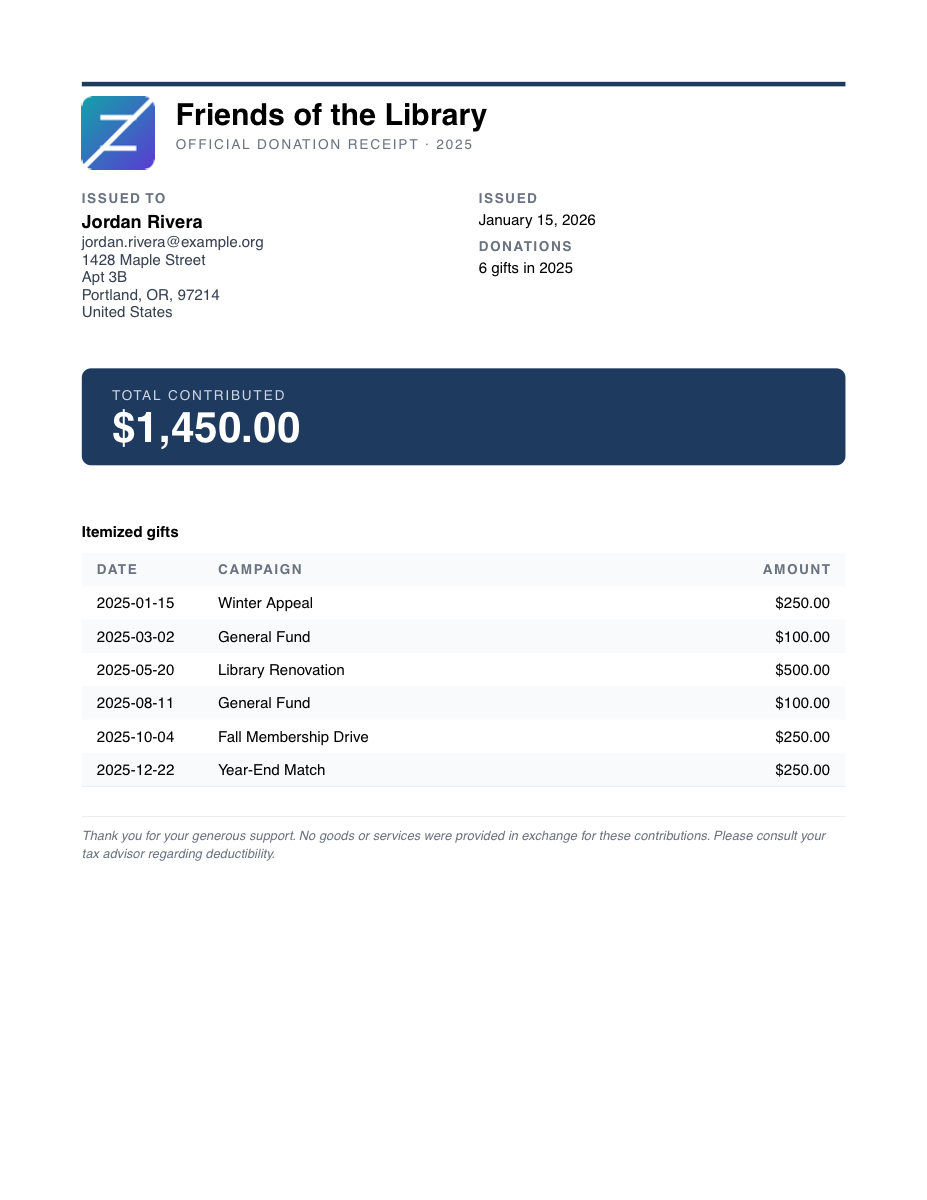
Download the sample PDF · regenerate with pnpm build && node examples/gen-sample-receipt.mjs
The PDF renderer reserves a small square slot for an org mark. Logos must meet these constraints — otherwise zfy prints a warning to stderr and falls back to text-only (no crash, batch keeps running):
| Constraint | Limit |
|---|---|
| Format | PNG or JPEG (sniffed from file bytes — extension is ignored) |
| File size | ≤ 2 MB |
| Minimum dimensions | 64 × 64 px |
| Shape | Square within ±10% (e.g. 512×512, or 500×510 — but not 800×200) |
Recommended: a 512×512 PNG with a transparent or white background.
Skip this section if you're only using the CLI directly. This is for plugging Zeffy into AI assistants that support the Model Context Protocol.
zfy-mcp is a stdio MCP server bundled with the package. Add it to ~/.claude.json (or Claude Desktop's claude_desktop_config.json):
{
  "mcpServers": {
    "zeffy": {
      "command": "zfy-mcp",
      "env": { "ZEFFY_API_KEY": "sk_xxx" }
    }
  }
}
Tools exposed:
| Tool | Description |
|---|---|
zeffy_list_payments |
List donations with date / status / campaign / contact filters |
zeffy_list_contacts |
List donors (lookup by email or date range) |
zeffy_list_campaigns |
List campaigns |
zeffy_eoy_report |
Per-donor annual summary (JSON or Markdown) |
Then ask your agent things like:
- "How much did we raise in Q4 2025?"
- "Who were our top 10 donors last year, and what did each give?"
- "Generate an EOY summary I can paste into our board report."
PDF and CSV output aren't exposed via MCP (binary data is awkward over stdio) — use the CLI for those.
Everything the CLI does is available as a typed TypeScript library, including the EOY aggregation and the format renderers.
import { Zeffy } from "@devessentials/zfy-cli";

const zeffy = new Zeffy(process.env.ZEFFY_API_KEY!);

// Single page (cursor-paginated under the hood)
const page = await zeffy.payments.list({ created_gte: 1735689600 });

// Auto-paginate across the whole range
for await (const p of zeffy.payments.iterate({ created_gte: 1735689600 })) {
  console.log(p.id, p.amount, p.contact?.email);
}

// Build and render an EOY report yourself
import { buildEoyReport, formatMarkdown, writePdfReceipts } from "@devessentials/zfy-cli";

const report = await buildEoyReport(zeffy, {
  year: 2025,
  timezone: "America/Los_Angeles",
});

console.log(formatMarkdown(report, 25));
await writePdfReceipts(report, "./receipts", { orgName: "Friends of the Library" });
The client handles 429 rate-limit responses (token bucket capped at 90 req/min, with Retry-After honored on backoff) and validates every response against zod schemas — bad shapes throw with the raw response attached for debugging.
zsh: command not found: zfy (or bash: zfy: command not found)
Your shell can't find the binary that npm install -g just placed on disk. Run npm prefix -g to print your global install prefix (e.g. /usr/local or ~/.nvm/versions/node/v22.x.x), then make sure <prefix>/bin is on your PATH. If you used nvm, switching Node versions changes the prefix — re-run the install after switching.
No Zeffy API key configured.
You haven't run zfy auth set yet, and ZEFFY_API_KEY isn't set in your environment. Run zfy auth set and paste the key when prompted.
API error 401: Invalid API key (or Zeffy API error 401: ... from other commands)
The key zfy has stored doesn't match what Zeffy expects. Either the key was regenerated (in which case run zfy auth clear && zfy auth set with the new one) or you copy/pasted with extra whitespace. zfy auth status is the simplest way to confirm — it hits the API and reports the failure.
Zeffy API error 429: Too Many Requests
You're hitting Zeffy's 100-requests-per-minute cap. zfy already throttles to 90/min and backs off on 429s, so this usually means something else on the same key is also calling the API. Wait a minute and retry.
"Where did my PDFs go?"
zfy report eoy --format pdf writes to the directory passed via --out, or — if --out is omitted — to ./eoy-<year>-receipts/ in your current working directory. The CLI prints the destination to stderr after it finishes.
zfy: skipping logo — image is not square (400×100); supply a square PNG/JPEG (e.g. 512×512)
Your --logo image violates the logo spec. zfy continues without the logo so a bad asset doesn't block the rest of the report. Crop your image to a square in any image editor and rerun. Other variants of this message (file too large, too small, unsupported format) all skip the logo the same way.
Want more detail on an error?
Re-run with DEBUG=1:
DEBUG=1 zfy payments list --from 2025-01-01This prints the full response body Zeffy returned, which usually pinpoints the issue.
git clone https://github.com/EssentialsDev/zfy-cli.git
cd zfy-cli
pnpm install
pnpm build         # tsup → dist/
pnpm test          # vitest
pnpm typecheck     # tsc --noEmit
CI runs typecheck, test, and build on every push and PR against Node 20 and 22. Releases publish automatically to npm when a v* tag is pushed.
MIT — see LICENSE. Not affiliated with Zeffy or Simplyk.
Found a bug or want to contribute? Open an issue or PR.